Categoría: security

  • Basic Security Recommendations in Development

    A few days ago, while reading a tweet on X, I came across someone who reported that all their cryptocurrency had been stolen from their wallet. This person is technically knowledgeable (they work professionally in IT), meaning they should have never experienced security issues at this level. In this tweet (which you can see below), they explain step by step what happened and how we can avoid the same fate:

    Although the thread focuses primarily on crypto (cryptocurrencies and digital trading), as always, I like to consider problems from multiple perspectives. I realized this is an issue that could affect others, too—and if this wake-up call can inspire some security improvements for everyone, that’s even better…

    Summarizing the extensive thread (which I highly recommend reading in full), a browser extension (for the Cursor development interface) managed to access the .env file, transmitted the user’s private key to the attacker, and the attacker drained the wallet in just a few hours. The loss was minor (only a few hundred dollars), but this incident demonstrates how even the most cautious can fall victim to supply chain attacks.

    It’s true that storing secrets in .env files is a common practice; however nowadays, for applications handling highly sensitive credentials, it’s recommended to use secure vault solutions, such as:

    • HashiCorp Vault (open source)
    • AWS Secrets Manager
    • Google Secret Manager

    These systems allow secure storage of credentials and generate temporary, encrypted tokens for access—so that an attacker can only obtain a limited token, not critical credentials.

    Another key principle of any secure development system is “environment separation”: that is, have fully separated environments for development, testing, and production (and any parallel systems for quality assurance, additional testing, etc.)

    This means each environment must have different access authorizations so that developers—or anyone else involved—never have direct access to production configuration data.

    So, summarizing these recommendations:

    • Do not store secrets in .env files.
    • Verify the authenticity of software authors and any extensions you use.
    • Use cold wallets exclusively for significant funds.
    • Audit extensions regularly.
    • Separate your working environments to enhance security.
    • Monitor systems regularly.

    I’ve always said that “security is the opposite of convenience.”

    We usually aim to simplify users’ lives, but once we add “security,” that simplicity often becomes “inconvenience.” Like needing to open an OTP app in addition to entering your credentials—that’s not supposed to be easy.

    Still, those of us working on the frontline developing solutions sometimes need to take more security measures—and tolerate greater discomfort than usual—for the sake of both the project at hand and other projects within the company.

    Whenever someone secures their systems with just a username and password, I’m reminded that:

    • Most people reuse their passwords across some—or all—services…
    • Some services have already been compromised, exposing usernames, passwords, etc. (e.g., via haveibeenpwned.com) …
    • An encrypted password can be decrypted in a short time…

    So, if you ever wonder, “should I do this to enhance security?”—the answer is always YES. Better to err on the side of paranoia than to have something stolen… especially since the ultimate goal is to avoid ending up in a situation like that poor guy experienced. Right?
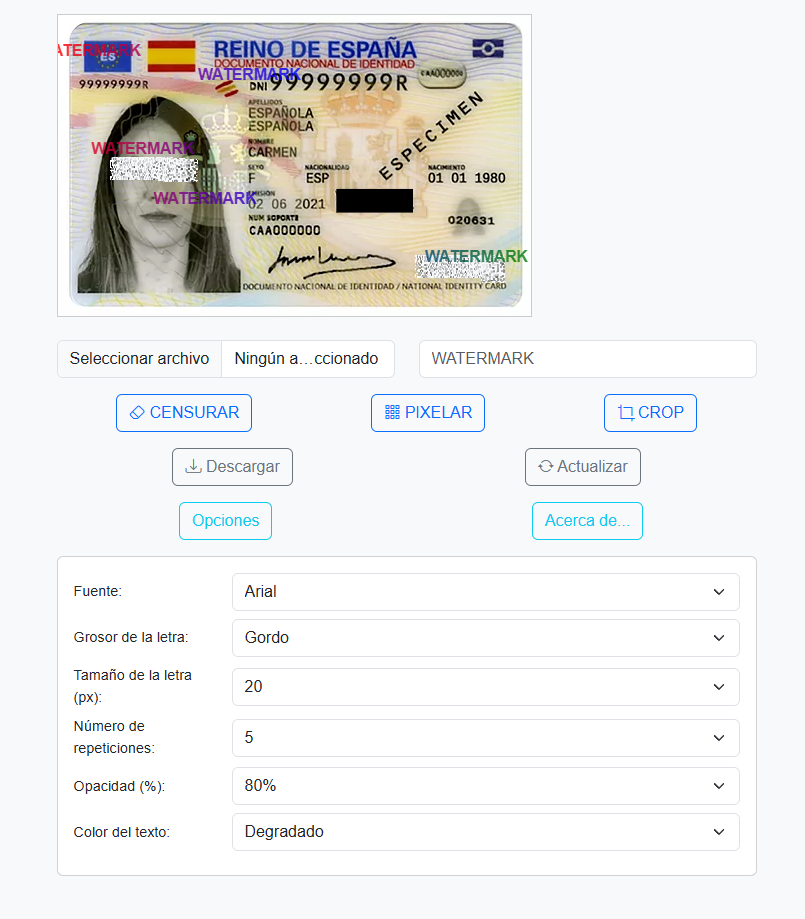
  • How to quickly add a watermark to your ID or identification document

    How to quickly add a watermark to your ID or identification document

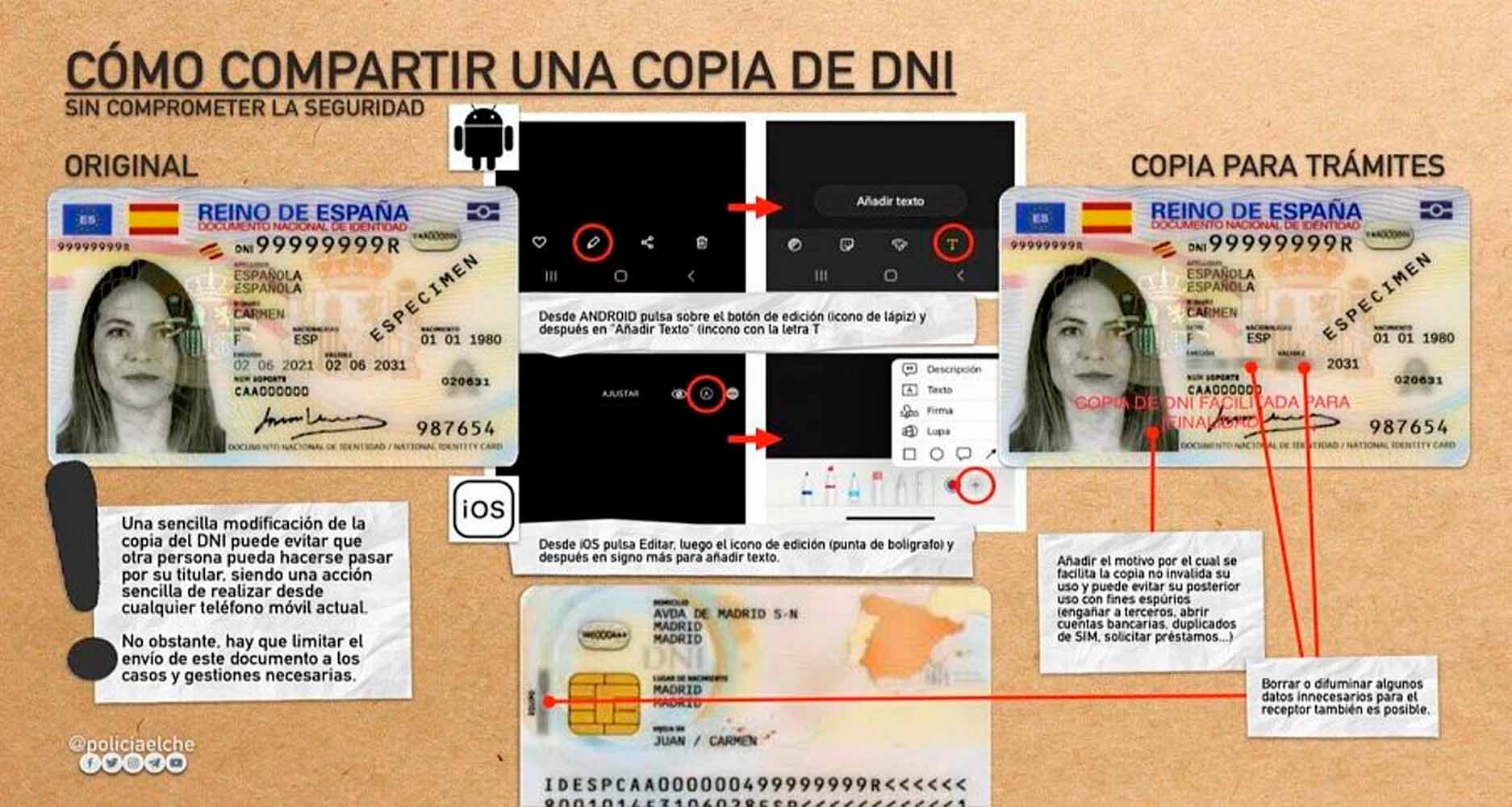
    It is clear that sending a photo of our ID to anyone over the internet is a bad idea: we run the risk of it being stolen, copied, or ending up in the wrong—or a stranger’s—hands, where someone could impersonate us, authorize transactions, or carry out illegal activities on our behalf.

    Unfortunately, there are procedures that require us to submit data from our ID, so it’s better to use a black-and-white photo with some of the information pixelated and a watermark indicating its authorized use.

    It might seem like something any photo editing application could handle, but there have been times when I needed to send an ID immediately and didn’t have time to add a watermark.

    For this reason, I have created a tool to add a watermark to our photos of our ID, passport, or any other identification document, featuring several interesting characteristics:

    • First and foremost: No image is ever shared; all editing is done using JavaScript in your own browser, making it completely secure.
    • It allows you to edit, censor, pixelate, or crop any part of the image you need, so you can conceal portions of your identifier.
    • You can fully customize the watermark: add any text you want, select the font, size, thickness, the number of times it appears, the color of the watermark, its opacity, etc.
    • This will generate your own modified image, ready to be shared with all the changes you have made.

    The tool is available at: https://sinologic.net/proyectos/watermark/

    If it suits you, feel free to bookmark it for whenever you need it.

  • The CNMC suffers an attack and 2 billion mobile phone line owners’ data records are leaked

    The CNMC suffers an attack and 2 billion mobile phone line owners’ data records are leaked

    According to a note issued by the Audiencia Nacional, the CNMC (National Commission for Markets and Competition) has just suffered an attack on its servers, resulting in the leaking of data from more than two billion mobile phone line holder records in Spain. (There are currently around 60 million active mobile lines, so the remaining data presumably correspond to former subscribers and numbers that were still in the CNMC’s possession.)

    Over 240GB of data have been stolen and, as the CNMC was the target, it is considered that national security has been compromised. As a result, the case now falls under the jurisdiction of the Audiencia Nacional and has been classified as a cyberattack offence.

    For Judge María Tardón, it is too early to determine what purpose the perpetrator or perpetrators might have pursued with this action. However, she stated: “What is already clearly evident, even at this initial stage of the investigation, is that we are dealing with a massive cyberattack against an entity whose position within the State’s structure and essential role, as described, represents a serious and undeniable institutional breach. This is particularly significant in such a sensitive and critical area for normal operations, namely ensuring the proper functioning, transparency, and effective competition across all markets and productive sectors, to the benefit of consumers and users.”

    I was personally unaware that the CNMC held personal data on mobile line owners (I had thought that only the mobile operators had this information), but if that is the case, it could be one of the largest data breaches of the year. The attackers’ motivation remains unknown.

    More information: https://www.poderjudicial.es/cgpj/es/Poder-Judicial/Noticias-Judiciales/La-Audiencia-Nacional-investiga-un-ciberataque-masivo-contra-la-CNMC-que-supuso-la-exfiltracion-de-datos-de-titulares-de-telefonia-movil

  • If you use GDMS, update your credentials.

    If you use GDMS, update your credentials.

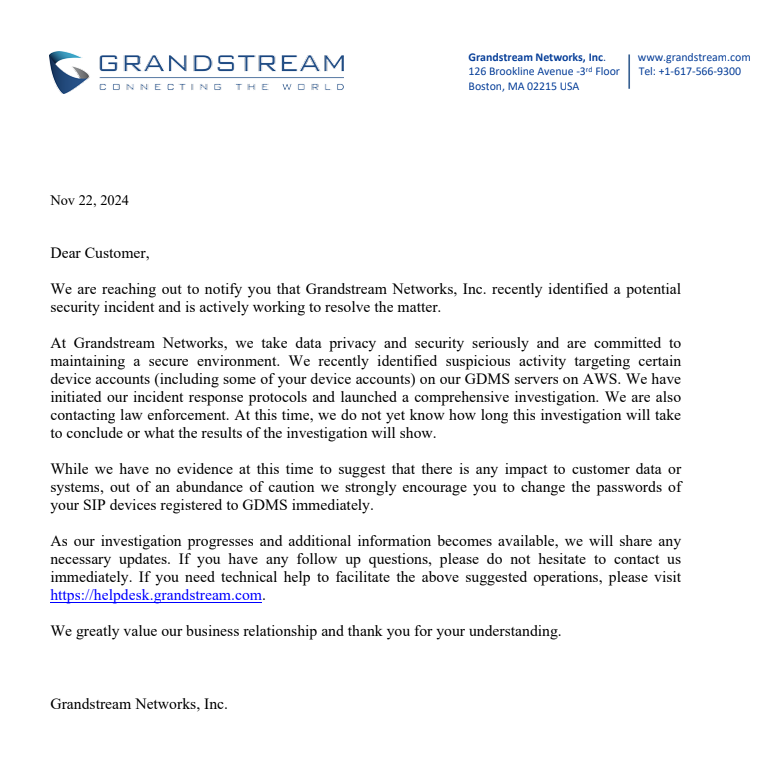
    Yesterday, we received a message from Grandstream notifying us that they have detected «suspicious activity» on the GDMS servers. As a result, they are advising all users of this platform to update and change their passwords as soon as possible.

    Specifically, the notice they sent is as follows:

    Officially, there is no confirmation of any attack or data leak from Grandstream. The notice appears to be more of a precautionary measure rather than a response to a confirmed issue. However, from our perspective, it is crucial to update the passwords for all SIP systems registered on GDMS.

    As dictated by basic cybersecurity practices, passwords should be changed every few months. Therefore, this is an excellent time to put this into practice, change them, and reset the counter.